Instagram SEO: How to Get Found in Search (Not Just the Feed)
Instagram has its own search engine, and since July 2025 Google indexes a slice of public posts too. Here's where your keywords actually matter.
Sep 8, 2026•9 min read
Read articleTurn any Instagram reel or video into MP3 in 3 quick steps
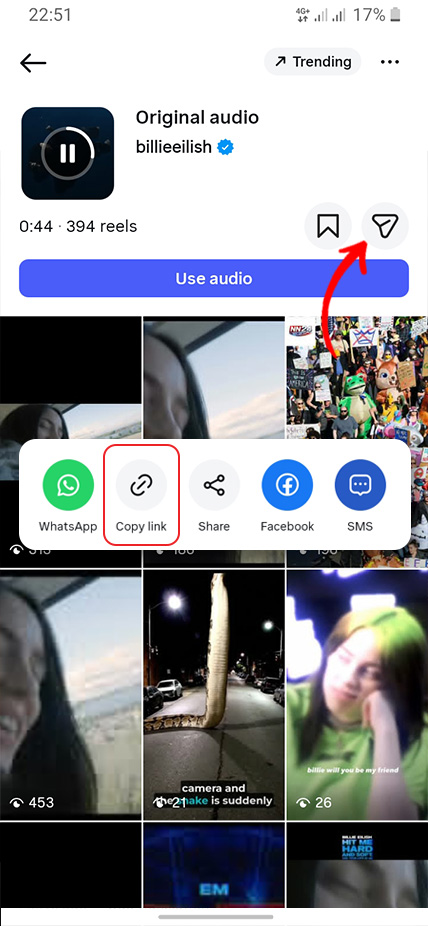
Open Instagram, tap ... on the reel, video, or story, and copy the link
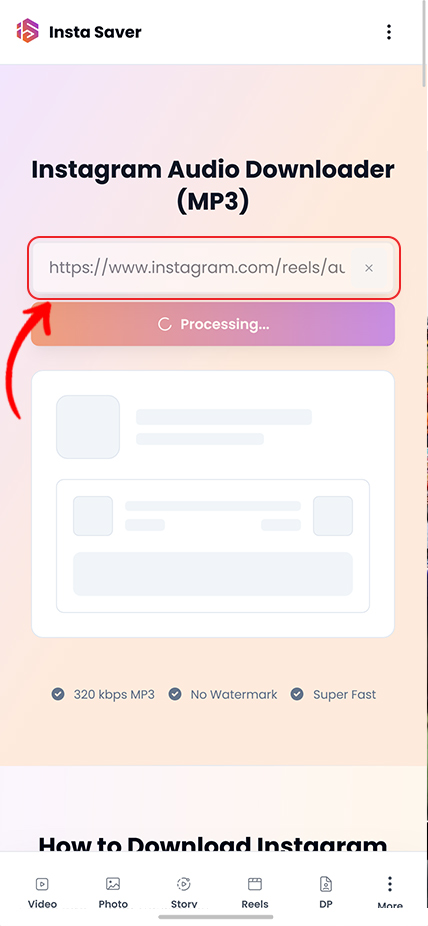
Paste the link into Insta Saver and start the MP3 conversion
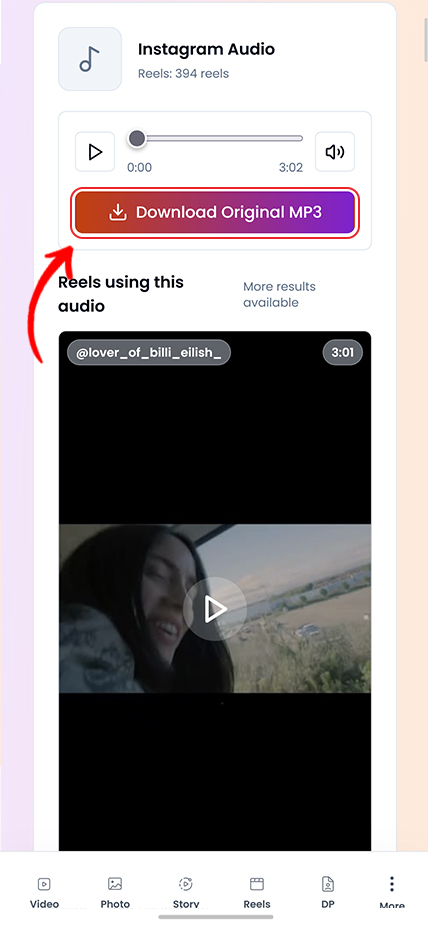
Download the audio instantly in high-bitrate MP3 ready for any device
Practical tips and strategies to elevate your Instagram game.
Instagram has its own search engine, and since July 2025 Google indexes a slice of public posts too. Here's where your keywords actually matter.
Instagram capped hashtags at five and quietly killed hashtag-follow. Here is what that actually means, and what to use instead for the reach hashtags used to promise.
Your photo looks crisp on your phone, then Instagram serves it back soft and washed out. You can't turn compression off — but you can hand Instagram a file it barely has to touch.
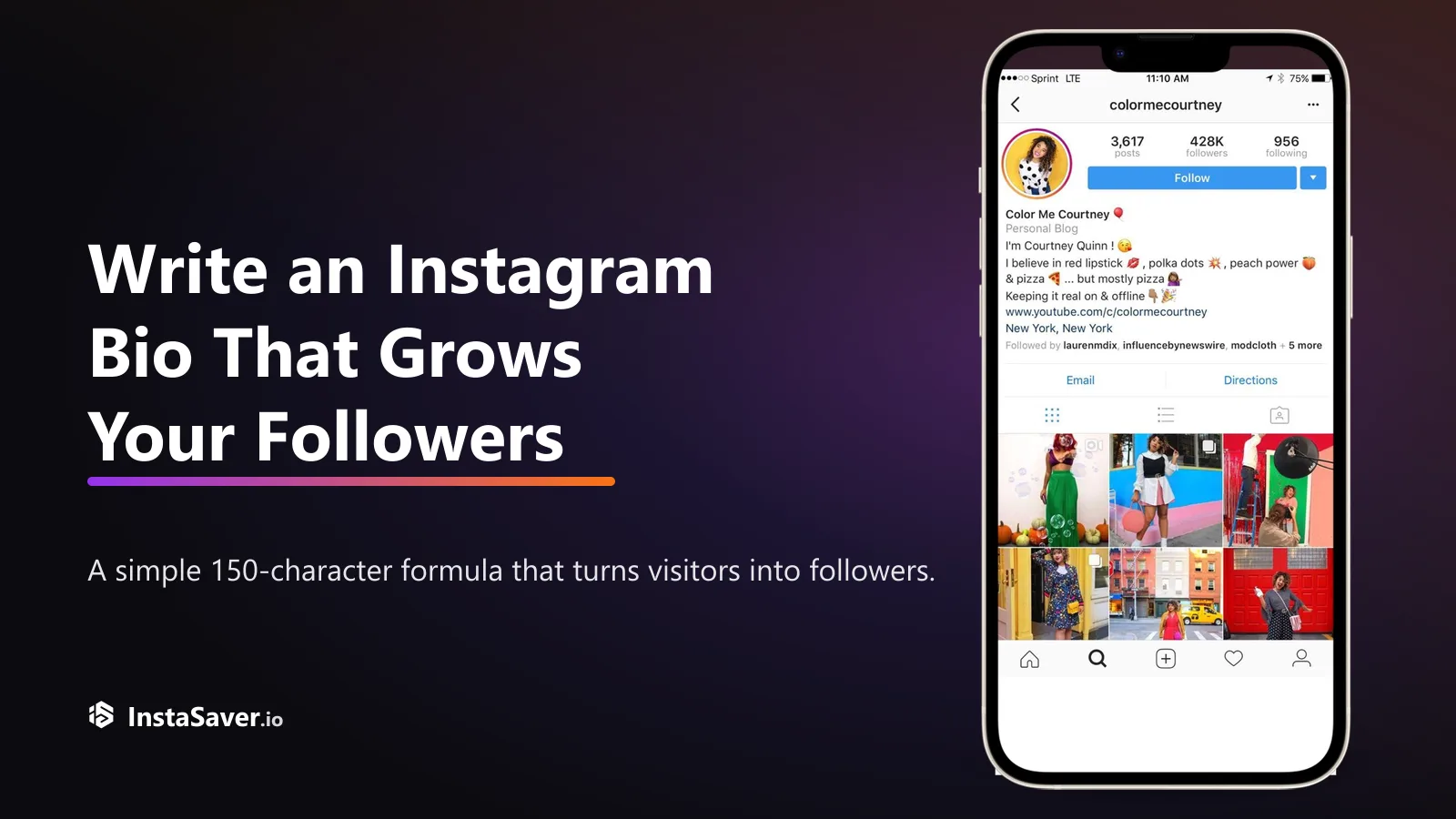
Someone lands on your profile with one question: 'why should I follow?' Your bio has about three seconds and 150 characters to answer it. Here's the formula that does.

The exact pixels for every Instagram format in 2026, and the safe zones where the app's own UI covers your content — so nothing important gets hidden behind a button.
Great captions don’t just describe the photo — they give people a reason to reply. Here’s the hook-body-CTA recipe, with real before-and-after rewrites.
Use this page when the music, voiceover, or spoken clip matters more than keeping the full video.

This page is designed to pull usable audio from public reels, videos, and stories when you need a standalone sound file instead of the full visual post.

Useful when you want to move from link to audio file quickly without downloading the entire video first.

Works well when you are saving spoken clips, music references, or your own sound tracks for later review.

Useful when you are comparing several public clips, building a reference folder, or keeping multiple sound-first examples together.

Audio results are cleanest when you start from a direct public reel, video, or story link instead of a shortened or broken shared URL.

For supported public media, you can start from the link itself without creating an Insta Saver account first.
Trusted by thousands of music lovers and audio content creators
"Finding trending sounds for my mixes has never been easier! The 320 kbps quality is perfect for professional use. This audio extractor is a must-have tool!"
Harley Rodriguez
DJ
"Extracting audio from viral reels helps me stay on top of trending beats. The MP3 quality is excellent and includes album art. Absolutely love it!"
Elliot Johnson
Music Producer
"Sometimes I need sound effects from Instagram videos, and this tool delivers perfectly. Fast conversion, high quality, and the metadata is a nice touch!"
Finley Brown
Podcast Editor
"Repurposing audio from my own reels is super easy now. I can create podcasts, add to other videos, and the quality never disappoints. Great tool!"
Rowan Lee
Content Creator
"The audio extraction is flawless - no distortion, no watermarks. I use it for sampling viral sounds and it always delivers professional-grade MP3s."
Kai Thompson
Sound Designer
"Discovering new music on Instagram reels is exciting, and this tool helps me save those tracks in high quality. The album art feature is fantastic!"
Sage Williams
Music Blogger
Common questions about saving Instagram audio as MP3
Sometimes the video is only a wrapper for the part you actually need. This page is for turning public Instagram clips into standalone audio files for listening, review, or archive.
Reels, videos, and stories often carry music, voiceovers, spoken announcements, or other sound elements that matter more than the visuals. Keeping the full post is not always necessary when the audio is the main target.
That makes an audio downloader useful when you want a lighter file for review, reference, or your own archive without storing the complete video.
When this page helps most
This page is best when the soundtrack, voice, or spoken section is the part you care about. If visuals, framing, or edit timing still matter, the Reels or Video pages are usually the better choice.
Separating those jobs keeps the workflow cleaner: full media when you need the post as posted, audio-only when the sound is enough.
What this page is best at
Copy the full reel, video, or story link directly from Instagram when possible. Clean links are more likely to return the correct media and avoid partial or broken extractions.
If the source clip is private, removed, or no longer available to you, the audio cannot be extracted here. This tool is for public or otherwise accessible media you are allowed to view.
Before you download
Downloading public audio does not transfer ownership or clear reuse rights. Music, voice, and spoken material may still belong to creators, brands, or other rights holders.
This tool is best used for backups, listening, research, and other legitimate workflows involving content you are allowed to access.
Good practice
Convert reels and videos to high-quality MP3 instantly-fast, free, and watermark-free.